
KeepyourSAPaccesscleanandaudit-ready—automatically.
Automated Segregation-of-Duties (SoD) risk analysis, mitigation, and audit reporting for SAP ECC and S/4HANA landscapes — connected directly via native SAP RFC integration.
When one person can create a vendor and release their payment — that's a fraud risk.
In sprawling SAP landscapes, users gradually accumulate conflicting authorizations — often unintentionally. Thousands of users, complex role structures, and slow manual reviews mean Segregation-of-Duties risk builds up silently, until an audit finds it first.
One user holding both can invent a fake vendor and pay them — with no second set of eyes. IZORA GRC runs automated user-level, role-level, and critical-access analysis to find every combination like this across your entire SAP landscape.
See SoD risk at every level — per user and inside every role.
Analyze users to find who holds conflicting access today, and analyze roles to catch conflicts before they are ever assigned.
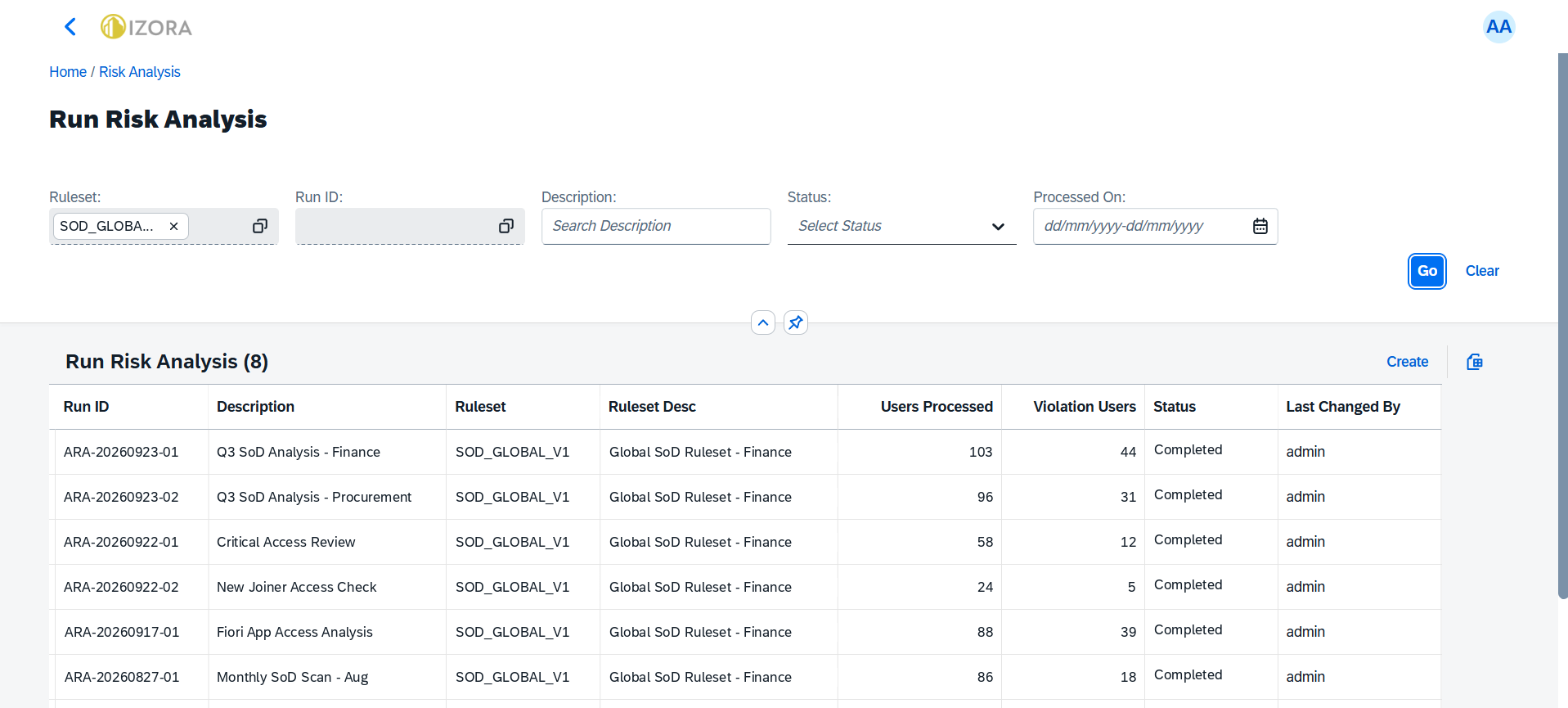
By User
- Analyze every user against your ruleset in a single run.
- See users processed and violation users per run.
- Every run gets a Run ID — traceable for audit.
By Role
- Scan thousands of roles in one run.
- Pinpoint roles that carry SoD conflicts before they reach a user.
- Use the results to drive role redesign and cleanup.

One workspace for SoD risk, end to end.

Ruleset Builder
Risk logic lives as configurable data, not hardcoded software — maintain global, project, and customer-specific rulesets with Excel import/export.
Live SAP Data Pull
Native SAP RFC integration synchronizes users, roles, tcodes, profiles, and authorizations from ECC and S/4HANA — no manual extraction.
One-Click Risk Analysis
Run user-level, role-level, critical-access, and conflicting-role analysis at scale. Every run gets a unique Run ID as permanent audit evidence.
Excel Export
Standard reports by user, by risk, risk review, conflicting roles, and pivot analysis — exported as clean, audit-ready workbooks.
Mitigation Records
Document compensating controls, business justification, and control owners for every accepted risk — auditable and traceable end to end.
Risk Dashboard
A live view across functions, actions, permissions, risks, users, mitigations, runs, and rulesets — enterprise-wide compliance posture at a glance.
From request to SAP role, fully governed.
Every access request follows one approval chain: requester, manager, then SAP admin. Once approved, GRC creates the role assignment in SAP automatically.

Request access
The requester logs in to GRC and requests an SAP business role that matches their function.
Manager review
The request lands in the manager's inbox for review and approval.
IT SAP check
The SAP admin team verifies the request and gives the final approval.
Auto-create in SAP
GRC provisions the approved role directly to SAP, with no manual steps.
Automatic via RFCEvery request, approval, and provisioning action is logged as audit evidence.
Periodic access reviews, run as campaigns.
Launch certification campaigns per department and SAP system, assign a business owner, and track every campaign to closure.

Create campaign
Scope it by department and SAP system, and set a due date.
Assign business owner
The owner is accountable for certifying access in their area.
Review & certify
Reviewers work through their queue in My Reviews.
Track to closure
See every campaign's status, from Pending to Closed.
Run it every quarter — auditors see a repeatable, documented review cycle.
Reset SAP passwords without a help desk ticket.
Users reset their own SAP passwords in four steps. Less Basis workload, and every reset is logged.

Open password reset
The user logs in to GRC and opens the self-service reset password menu.
Select system & user ID
Choose the target SAP system and enter the SAP user ID.
Submit & confirm
Submit the reset and wait for the success notification in GRC.
Recover via email
A password recovery email is sent to the user's registered address.
Recovery via emailEvery reset is logged with time, user ID, and target SAP system.
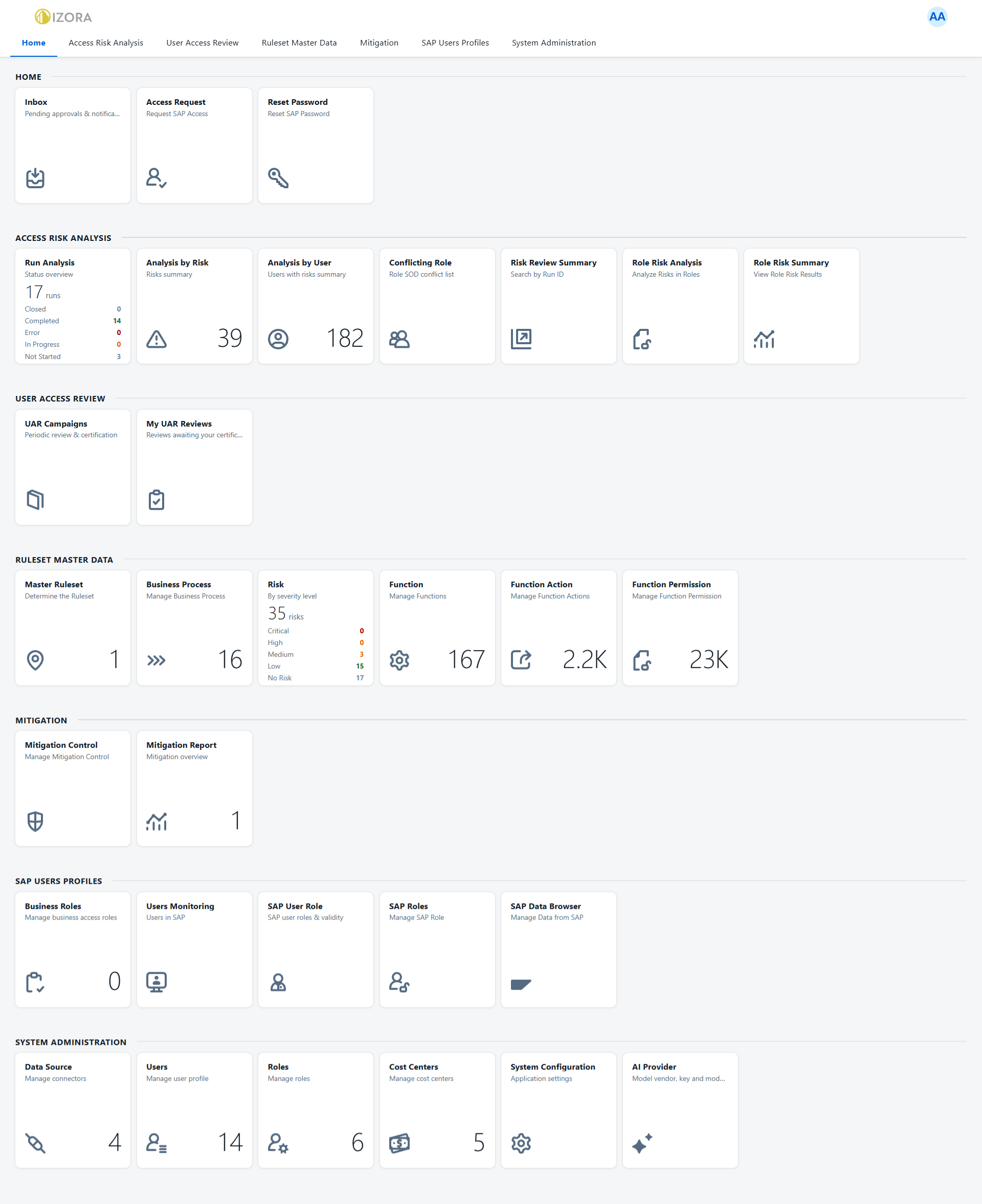
One launchpad for every SAP access control.
Risk analysis, access reviews, ruleset, mitigation, SAP user profiles and administration — all in one workspace.
Built for everyone accountable for SAP access risk.
Role-based access control gives each person exactly the actions they need — from daily operators to independent auditors.
Supported landscapes: SAP ECC and SAP S/4HANA. Governance controls: role-based access, permission-controlled actions, user group management, token-based authentication.
From ruleset to report in three steps.
Define Ruleset
Configure or import functions, permissions, risks, and mitigations — as data, not code.
Pull SAP Data
Sync SAP users, roles, tcodes, and authorizations live via RFC — or import from file.
Run Analysis & Report
Detect conflicts, mitigate what's accepted, and export audit-ready evidence — every run preserved under its own Run ID.
Ready to clean up your SAP access?
See IZORA GRC connect to a live ECC or S/4HANA landscape, run an SoD analysis, and hand you an audit-ready report — in one session.
Request a Demo